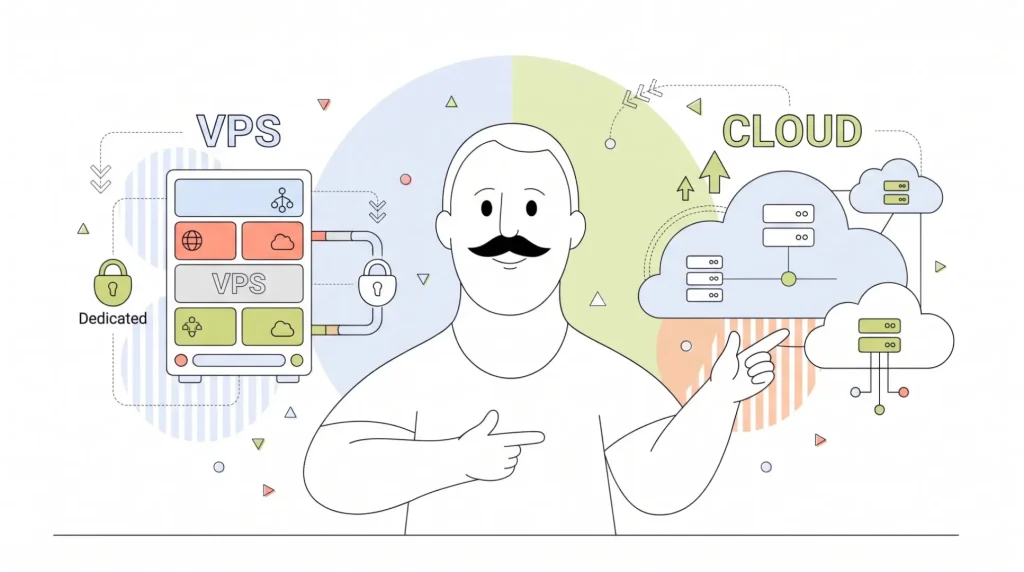
A Virtual Private Server (VPS) gives you a fixed slice of one physical machine, while cloud hosting spreads your site across a pool of machines. That’s the short answer to the VPS vs. cloud hosting question: fixed resources at a fixed price, or flexible resources at a flexible price.
If you’re debating between the two, you’ve probably outgrown shared hosting. You have both options open in a browser tab, the specs look oddly similar, and you can’t work out why one costs more than the other. That’s a fair place to be stuck, because the difference between VPS and cloud hosting is mostly hidden in how each one is built.
By the end of this guide, you’ll know four things: how each type of hosting works, how a VPS hosting vs. cloud server setup differs in scaling and cost, which one fits which kind of site, and how to move between them without breaking anything.
- VPS vs. Cloud Hosting at a Glance
- How Does VPS Hosting Work?
- How Does Cloud Hosting Work?
- The Real Differences Between VPS & Cloud Hosting
- Is Cloud Hosting Better Than VPS?
- Which One Should You Choose?
- What About Cloud VPS?
- How to Switch Between VPS & Cloud Hosting
- Match Your Hosting to Your Traffic

VPS vs. Cloud Hosting at a Glance
| VPS Hosting | Cloud Hosting | |
| Server setup | One physical server, split into virtual machines | A network of connected servers |
| Resource allocation | Fixed, dedicated to you | Drawn from a shared pool |
| Scaling method | Upgrade to a bigger plan | Add or remove resources on demand |
| Billing model | Fixed monthly price | Usage-based |
| If hardware fails | Downtime until the server is restored | Workload shifts to another machine |
| Technical skill needed | Moderate (or none with Managed VPS) | Moderate to high |
| Best-fit site type | Steady-traffic sites and stores | Apps with unpredictable traffic |
In this cloud hosting vs. VPS comparison, start with what’s the same. Both give you root access, isolated resources, and far more power than shared hosting. The real difference is what happens when your traffic changes.
Most of the price confusion comes down to one idea. A VPS is priced like rent, and cloud hosting is priced like a utility bill. Rent stays the same whether you’re home or not. A utility bill follows what you use, which can be a bargain in a quiet month and a shock in a busy one.

How Does VPS Hosting Work?
With VPS hosting, one physical server is split into several virtual machines. That’s the virtual private server explained in plain terms. Each machine gets its own:
- Operating system
- Central Processing Unit (CPU) cores
- Memory (RAM)
- Storage
None of it is shared with the neighbours. That’s what people mean by dedicated resources hosting. Your resources are yours whether you use them or not, so performance stays steady, and the monthly bill never surprises you.
There are two real limits worth knowing up front. First, you scale by upgrading your plan, not automatically. When you need more power, you move up a tier. Second, everything runs on one physical machine, so it depends on that machine staying healthy.
In practice, neither limit bothers most growing sites. Upgrading a plan takes minutes, and quality hosts monitor and back up their hardware so they catch problems early. You can also choose how hands-on you want to be. An Unmanaged VPS leaves server upkeep to you, while a Managed VPS lets the host handle updates, security patches, and monitoring.
HostPapa VPS Hosting runs on enterprise-grade NVMe (Non-Volatile Memory Express) storage and performance-tuned servers. cPanel comes as standard, so if you’re moving up from shared hosting, there’s no new dashboard to learn. If you want to see how a VPS fits a smaller business, read our guide to VPS hosting for small business.

How Does Cloud Hosting Work?
With cloud hosting, your site runs across a connected group of machines instead of just one. Resources come from a shared pool, so capacity can grow or shrink without moving your site. This kind of distributed hosting is built for change.
The headline benefit is failover. If one machine in the pool has a problem, your workload shifts to another one, which is why cloud plans tend to quote higher uptime figures.
Scaling works the same way. Picture an online store that gets mentioned on a popular podcast. Traffic jumps tenfold for an afternoon. On a true cloud platform, extra resources kick in to handle the rush, then wind back down once things calm down. You don’t have to log in and change anything.
Be careful with the label, though. Providers use “cloud hosting” for very different products, including:
- A fully managed platform with automatic scaling.
- A cluster of servers with real failover.
- A single remote server billed monthly and labeled “cloud”.
Before you compare cloud server hosting prices, check what the resource pool actually is.
Cloud has two honest limits, too. Usage-based billing means your invoice moves with your traffic. And moving off a cloud platform later can be harder than moving off a VPS, especially if you’ve built around its proprietary tools.
One last point: failover isn’t magic. You still share responsibility for your site, and a badly configured site will fail on any setup.

The Real Differences Between VPS & Cloud Hosting
Here’s where the two options actually split. Each difference below starts with the verdict, then explains why.
Architecture
A VPS runs on one machine; cloud hosting runs on a pool of machines. Everything else in this section follows from that one fact. Keep it in mind as you read on.
Scaling
A VPS scales in steps, while cloud scales in small increments, often automatically. On a VPS, you move to a bigger plan when you need more, sometimes with a short reboot. On the cloud, resources can be added as traffic climbs.
When it comes to cloud hosting vs. VPS scalability, here’s the qualifier: step scaling is only a drawback if your traffic is unpredictable. Most small business sites aren’t.
Think about what your traffic really looks like. A local accounting firm, a bakery’s online ordering page, or a consultant’s portfolio sees roughly the same number of visitors week after week. Even a holiday rush is something you can see coming and plan an upgrade around.
Performance
Cloud wins on burst, and a VPS wins on steady load. On VPS vs. cloud hosting performance, benchmark testing has repeatedly shown a well-specified VPS matching or beating a comparable cloud instance on sustained workloads. The reason is simple: fixed cores don’t share a scheduler with anyone else, so there’s less contention when your site is working hard for long stretches.
Burst means short, sharp jumps in demand, like a flash sale or a viral post. Steady load is the everyday work of serving pages, running checkouts, and processing database queries. Most business sites spend the vast majority of their time in the second category.

Cost & Billing
A VPS costs less for steady traffic, while cloud can cost less for a site that sits idle. A VPS comes with fixed monthly pricing. Cloud hosting has a meaningful premium over an equivalent VPS for steady traffic, because you pay extra for flexibility you may never use. A site that’s quiet most of the month, on the other hand, can come out cheaper on cloud.
Here’s a simple way to picture it. If your site uses about the same amount of CPU and memory every day, a VPS lets you pay once for exactly that. On a cloud plan, you’d pay for the same resources plus the machinery that lets them stretch, whether or not they ever do. Budget predictability matters, too: a fixed bill is easier to plan around than one that changes every month.
Uptime & Redundancy
Cloud has the structural advantage here, plain and simple. A VPS depends on one machine, so a hardware failure means downtime until it’s restored. Cloud can route around a failed machine.
That said, keep the practical picture in view. A 99.9% uptime guarantee covers what most small business sites actually need.
Regular backups close much of the remaining gap. If something does go wrong, a recent backup means you’re restoring a site, not rebuilding one.
Control & Management
Both give you root access, but they ask different things of you. Cloud platforms add a scaling layer you’ll need to learn and configure. A Managed VPS goes the other way and hands the server work to someone else.
With HostPapa, that someone is PapaSquad, our support team, available 24/7 by phone, chat, and email.

Is Cloud Hosting Better Than VPS?
No, cloud hosting isn’t better than a VPS. It’s better at different things.
Cloud does some things better than a VPS, and we’ll say so plainly. It’s stronger at:
- Absorbing sudden traffic spikes.
- Surviving hardware failure without downtime.
- Supporting apps that need to grow fast.
If any of those describe your situation, cloud earns its price.
But “cloud hosting vs. VPS, which is better?” is the wrong question. The useful question isn’t which technology is more advanced. It’s which one matches the traffic pattern you actually have. A site with steady traffic gets no benefit from elastic scaling, yet it pays for that flexibility every single month.
It also helps to know who’s doing the talking. Much of the “cloud is better” content online is published by companies that sell cloud plans, so the framing is rarely neutral. That doesn’t make it wrong, but it’s worth reading with that in mind.
So when you’re weighing VPS or cloud hosting for small business, use this rule. If you can roughly predict what next month looks like, a VPS is the better buy. If you can’t, pay for the flexibility.

Which One Should You Choose?
Still weighing a VPS hosting vs. cloud server setup? Find yourself in one of the two lists below. It takes about 10 seconds.
Choose a VPS If…
Here’s when to choose VPS hosting:
- Your traffic is steady, or seasonal in a way you can forecast.
- You run a business site or store with predictable order volume.
- You want a fixed monthly budget with no surprises.
- Your WordPress or eCommerce site has outgrown shared hosting.
- You host several client sites on one machine.
- You want full server control without a scaling layer to manage.
For most shops comparing VPS or cloud hosting for eCommerce, a VPS covers the predictable rhythm of orders well.
Choose Cloud Hosting If…
- Your traffic swings hard and without warning.
- You’re running an app rather than a website.
- You need multi-region delivery.
- Downtime carries a direct revenue cost measured in minutes.
- Someone on your team already manages cloud resources.
The Middle Path
Here’s what most people actually do, and it’s often the best hosting for a growing website: start on a VPS, watch your resource graphs, and move only when the numbers say so. Migration between the two is routine, so you’re not locking yourself in.

What About Cloud VPS?
If you’ve run into the term cloud VPS mid-research and wondered whether it’s a third option, you’re not alone.
A Cloud VPS is a virtual private server built on a pool of machines instead of one. It keeps VPS-style isolation and root access, and adds failover and faster resizing on top.
So, is cloud VPS the same as VPS? Not always, and this is the awkward part. Some providers use cloud VPS to describe a real product difference. Others use it as a label on a standard VPS.
When you’re weighing a cloud VPS vs. traditional VPS, use one simple buying test. Ask the provider: “What happens to my server if the host machine fails?” If the answer is that it moves to another machine automatically, it’s a true cloud VPS. If the answer is that it’s restored once the hardware is fixed, it’s a standard VPS with a different name.

How to Switch Between VPS & Cloud Hosting
Worried about breaking your site during the move? That’s the most common reason people stall after deciding, and it’s easier to avoid than you’d think.
The easiest route is to skip the work entirely. HostPapa offers a FREE white-glove migration service, so our team moves your site for you.
If you’d rather handle it yourself, whether you plan to migrate a VPS to the cloud or move a website to a VPS, the sequence looks like this:
- Take a full backup of your site.
- Copy your files and databases to the new server.
- Test everything on the new server before switching.
- Lower your Domain Name System (DNS) time-to-live (TTL) a day or two in advance.
- Cut over during a quiet traffic window.
Two things people often forget: hard-coded URLs sitting in the database, and email deliverability after the IP address changes.
Once the switch is done, spend a few minutes checking the essentials: load your main pages, place a test order if you run a store, submit a contact form, and send a test email. Keep your old server running for a few days as a safety net before you cancel it.
The good news on hosting migration downtime? Most small business sites move in a day or less, with no visitor-facing downtime at all.

Match Your Hosting to Your Traffic
The whole VPS vs. cloud hosting decision comes down to one rule: predictable traffic and a predictable budget point to a VPS, while unpredictable traffic points to cloud. And remember, most small business sites don’t need elastic scaling at all.
If your site has outgrown shared hosting and you want steady performance at a price that doesn’t move, it’s time to get started with HostPapa VPS. Every plan comes with NVMe storage, cPanel, and free migration, so moving over takes nothing off your plate.
Explore HostPapa VPS Hosting plans and see which one fits.
Still not sure which way to go? Talk to PapaSquad. We’re here 24/7 by phone, chat, and email, and happy to help you pick the right plan.