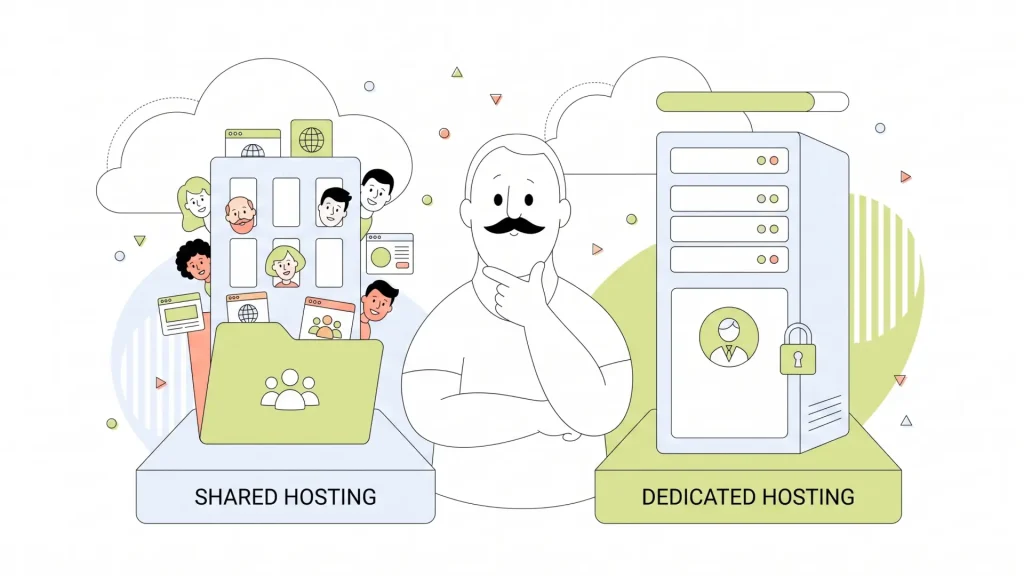
Picking a web host can feel a lot like picking a place to live. Do you want a cozy apartment where the landlord handles the plumbing and you split the building costs with your neighbours? Or do you want your own house, where you control every wall, wire, and lock, but you’re also the one calling the electrician at 2 a.m.?
That’s essentially the choice between shared hosting and dedicated hosting, two of the most common types of web hosting and, conveniently, two ends of the exact same spectrum. On one side, you’ve got affordability and simplicity. On the other, you’ve got raw power and total control. Where you land on that spectrum shapes your site’s speed, security, scalability as you grow, and, let’s be honest, how much of your budget it eats up every month.
In this article, we’ll break down exactly what each option means, who they’re built for, and how to know when it’s time to make the jump from one to the other.
- What Is Shared Hosting?
- What Is Dedicated Hosting?
- Shared vs. Dedicated Hosting: Side-by-Side Comparison
- Shared Hosting: Pros & Cons
- Dedicated Hosting: Pros & Cons
- Performance: Shared vs. Dedicated Hosting
- Security: Shared vs. Dedicated Hosting
- Pricing: How Much Does Each Hosting Type Cost?
- Who Should Use Shared Hosting?
- Who Should Use Dedicated Hosting?
- What About VPS & Cloud Hosting?
- When Should You Migrate from Shared to Dedicated Hosting?
- Does Hosting Affect SEO?

What Is Shared Hosting?
Think of shared hosting as an apartment building for websites. One physical server hosts dozens (sometimes hundreds) of websites at once, and all of those sites split the same pool of resources: CPU, RAM, storage, and bandwidth. You’re not paying for the whole building; you’re paying for your unit, and the cost of running the place gets divided among everyone living there. That’s exactly why shared hosting is so cheap.
Here’s how it actually works behind the scenes: your hosting provider owns and manages the server, and every website on it draws from the same shared pool of computing power. When your site gets a visitor, the server allocates a slice of its resources to handle that request, then moves on to the next site’s traffic, and the next, and so on. It’s efficient, and for most small and medium-sized sites, it’s more than enough horsepower to run smoothly.
The best part for beginners? You don’t touch the technical side at all. Your host handles:
- Server maintenance and hardware upgrades.
- Software updates and security patches.
- Uptime monitoring and backups (on most plans).
- Basic security measures like firewalls and malware scanning.
That hands-off approach is exactly why shared hosting has become the default starting point for small websites, blogs, portfolios, and startups that don’t yet have massive traffic demands. You get a working website without needing to know what a server even looks like.
What Is Dedicated Hosting?
Now flip the script. Dedicated hosting means you’re not sharing anything; you get an entire physical server, all to yourself. No neighbours, no splitting resources, no waiting your turn for CPU cycles. Every ounce of that server’s power is dedicated (hence the name) exclusively to your website.
This is the home ownership of web hosting. And just like owning a house, that comes with both freedom and responsibility. With dedicated hosting, you typically get:
- Full root access, meaning you can configure the server exactly how you want it.
- Choice of operating system, software stack, and security tools.
- Complete customization, from custom firewall rules to specific application installations.
- Guaranteed resources, since nothing is shared with anyone else.
That level of control is powerful, but it’s also a bigger commitment. Dedicated hosting tends to cost more than shared hosting and typically requires technical know-how to set up and maintain, unless you opt for a managed plan, which we’ll get into later. It’s the natural fit for high-traffic websites, enterprise platforms, and any business handling sensitive data where security and performance can’t be left to chance.

Shared vs. Dedicated Hosting: Side-by-Side Comparison
Sometimes the fastest way to understand a decision is to see it laid out in black and white. Here’s how shared and dedicated hosting stack up across the factors that matter most:
| Factor | Shared Hosting | Dedicated Hosting |
| Resource Allocation | Shared among multiple websites on one server. | Entire server dedicated to a single website. |
| Performance | Good for moderate traffic; can dip during neighbour traffic spikes. | Consistently high, unaffected by other sites. |
| Security | Managed by host; some risk from other sites on the server. | Fully isolated environment with custom security controls. |
| Customization | Limited to what the host’s control panel allows. | Full root access and complete configuration freedom. |
| Scalability | Fine for growth up to a point, then requires an upgrade. | Built to handle large-scale growth and traffic surges. |
| Cost | Budget-friendly, starting from $2.95 per month. | Higher investment, starting from $59.95 per month. |
| Best-Fit Use Case | Blogs, portfolios, startups, small businesses. | eCommerce at scale, enterprise platforms, high-traffic sites. |
The trade-off really comes down to one simple tension: cost versus control. Shared hosting keeps your overhead low and your learning curve short, while dedicated hosting gives you total control over your server environment at a much higher price. HostPapa offers plans on both ends of that spectrum, so you can start small and scale up whenever you’re ready.

Shared Hosting: Pros & Cons
Every hosting type comes with trade-offs, and shared hosting is no exception.
The Pros:
- Budget-friendly pricing: Shared Hosting plans with HostPapa start as low as $2.95 a month, making it the most accessible entry point to having a website.
- Zero technical expertise required: You don’t need to know how to configure a server; your host handles the heavy lifting, and most control panels are built for total beginners.
- All maintenance is handled for you: Software updates, security patches, and hardware upkeep are the provider’s job, not yours.
- Quick setup: You can typically have a shared hosting account up and running within minutes.
The Cons:
- The “bad neighbour effect”: Because resources are shared, a traffic spike or resource-heavy website sitting on the same server as you can slow your site down, even if you did nothing wrong.
- Limited customization: You’re working within the boundaries your host sets, so highly specific software or configuration needs may not be possible.
- Higher IP blacklisting risk: Since you share an IP address with other sites, if one of your server neighbours gets flagged for spam or malicious activity, your site’s reputation can occasionally take collateral damage.
There’s also a nice bonus that doesn’t get talked about enough: shared hosting is genuinely more eco-friendly. Because one physical server supports dozens of websites instead of each site requiring its own dedicated machine, shared hosting uses fewer physical servers overall. Fewer servers mean lower energy consumption and a smaller collective carbon footprint, a small but real win if sustainability is a factor in your decision-making.

Dedicated Hosting: Pros & Cons
Dedicated hosting flips almost every one of those trade-offs on its head, for a price.
The Pros:
- Full resource exclusivity: Every bit of CPU, RAM, and bandwidth on the server belongs to your site alone.
- Maximum security: You can install custom firewalls, set your own security protocols, and never worry about a shared IP dragging down your reputation.
- Complete server customization: From the operating system to the specific software stack, you decide how the server is built and run.
- Consistent, reliable performance: No neighbours means no unexpected slowdowns from someone else’s traffic surge.
The Cons:
- Higher cost: Dedicated hosting plans with HostPapa start at $59.95, which is a greater financial commitment than shared hosting.
- Technical expertise required: Configuring and securing a dedicated server isn’t beginner-friendly; you’ll need either in-house expertise or a hired server admin.
- Ongoing maintenance burden: Updates, patches, monitoring, and troubleshooting all fall on you (or your team) unless you take a specific route to lighten that load.
That “specific route” is managed dedicated hosting, and it’s worth knowing about if the maintenance side of dedicated hosting sounds intimidating. With a managed plan, your hosting provider handles server-level upkeep, including security patching, monitoring, backups, and technical support, while you still get the full resource exclusivity and performance benefits of a dedicated server. It costs a bit more than an unmanaged plan, but it fills in the gaps if you have limited technical experience.

Performance: Shared vs. Dedicated Hosting
Here’s where the rubber meets the road. Performance is often the single biggest factor that pushes a growing website from shared to dedicated hosting, so it’s worth understanding exactly why.
On a shared server, your site’s performance is somewhat at the mercy of your neighbours. If another website on your server suddenly gets a traffic surge, your own site can slow down as a side effect, even though nothing changed on your end. It’s usually not dramatic, and most reputable hosts manage resource allocation carefully to minimize this. But it’s a real possibility that simply doesn’t exist with dedicated hosting.
This matters more than it might seem, because performance is directly tied to Core Web Vitals, the metrics Google uses to measure page experience, including Largest Contentful Paint (LCP), First Input Delay (FID), and Cumulative Layout Shift (CLS). These metrics are heavily influenced by how quickly your server can respond to requests, which comes right back to how much resource availability you actually have.
For most everyday websites, shared hosting performs perfectly well. But if you’re running:
- A high-traffic eCommerce store with thousands of daily visitors.
- A media-heavy site full of video content or large image galleries.
- An application that needs to process a lot of data in real time.
…dedicated hosting will consistently outperform shared hosting, especially as your traffic scales.

Security: Shared vs. Dedicated Hosting
Security is another area where the apartment building vs. private house analogy really holds up.
With shared hosting, you’re living in a well-managed building, but you still share some infrastructure with your neighbours. If another site on your server gets compromised or starts sending spam, there’s a small chance your shared IP address could get caught in the blast radius. Reputable hosts like HostPapa mitigate this with strong isolation practices between accounts, but it’s a structural reality of the shared model that’s worth knowing about.
Dedicated hosting removes that variable entirely. Because you’re the only one on the server, there’s:
- No shared IP vulnerability to worry about.
- Full ability to install and configure your own firewall and security software.
- An isolated environment where a breach on someone else’s site simply can’t touch yours.
That said, shared hosting doesn’t mean unprotected. HostPapa builds server-level security into its Shared Hosting plans too, including Free SSL Certificates, malware protection, and secure data center infrastructure, so even budget-conscious website owners aren’t left exposed. If security is a top priority for your project, it’s worth comparing HostPapa’s security features across both hosting types to see what level of protection actually fits your risk profile.

Pricing: How Much Does Each Hosting Type Cost?
Let’s talk numbers, because at the end of the day, budget is often the deciding factor.
Shared hosting is the clear winner in terms of price. At HostPapa, Shared Hosting plans typically range from $3 to $10 per month, depending on the tier and included features. For a solo blogger or a small local business just getting online, this is an incredibly low barrier to entry.
Dedicated hosting lives in a completely different price bracket. At HostPapa, Dedicated Hosting plans can range from $60 to $500 per month. Where you fall in that range depends on the server specs you need (CPU, RAM, storage) and whether you choose a self-managed or managed plan. Managed dedicated hosting costs more upfront, but it folds in technical support and maintenance, which can actually save money in the long run if it means you’re not hiring a dedicated IT person.
HostPapa offers current pricing across both hosting categories, and it’s worth checking the Shared Hosting plans page and the Dedicated Hosting plans page directly, since pricing and included features can shift over time.

Who Should Use Shared Hosting?
Shared hosting isn’t a compromise; for many websites, it’s genuinely the right fit. It tends to make the most sense if you fall into one of these categories:
- Beginners launching their very first website.
- Personal blogs and portfolios without heavy traffic demands.
- Small business websites that need a professional presence without a big budget.
- Startups watching every dollar in their early stages.
As a general rule of thumb, shared hosting comfortably handles sites with roughly 50,000 monthly visitors and no unusual server requirements. If that describes your project, there’s no need to overspend on more horsepower than you’ll actually use.
HostPapa’s Shared Hosting plans are built specifically for this audience with 24/7 customer support and a beginner-friendly cPanel interface, so even if you’ve never touched a hosting dashboard before, you won’t be left figuring it out alone.

Who Should Use Dedicated Hosting?
Dedicated hosting earns its price tag when your website’s needs genuinely outgrow what a shared environment can offer. It tends to be the right call for:
- Large eCommerce stores processing high volumes of traffic and transactions.
- Financial or healthcare websites handling sensitive customer data.
- Gaming servers that need consistent, low-latency performance.
- High-traffic media sites streaming video or serving large amounts of content.
There are also some clear signals that it’s time to consider upgrading, even if you didn’t think you’d need dedicated hosting this soon:
- Your shared server keeps crashing or slowing to a crawl during traffic spikes.
- You’re subject to compliance requirements like PCI-DSS or HIPAA that demand a controlled environment.
- Your application needs a custom software stack that shared hosting simply can’t support.
For US-based businesses in particular, it’s worth noting that HostPapa operates multiple global data center locations, which means you can choose dedicated server options with lower latency for your specific audience, a detail that can make a real difference for performance-sensitive applications.

What About VPS & Cloud Hosting?
Shared and dedicated hosting aren’t the only two options on the table, and it would be a disservice not to mention the middle ground, because for a lot of growing websites, that’s actually where the sweet spot lives.
- VPS Hosting (Virtual Private Server) takes a single physical server and divides it into multiple virtual partitions, each acting like its own private server. You get significantly better performance and more control than shared hosting, without the full cost of a dedicated server. It’s the natural next step for a site that’s outgrown shared hosting but doesn’t need an entire dedicated machine.
- Cloud Hosting takes a different approach entirely. Instead of relying on one physical server, your site’s resources are distributed across a network of servers. If one server has an issue, another picks up the slack, which makes cloud hosting exceptionally good at handling uptime reliability and sudden traffic spikes without missing a beat.

When Should You Migrate from Shared to Dedicated Hosting?
There’s no universal deadline for switching from shared to dedicated hosting, but there are some pretty reliable warning signs that tell you it’s time.
Watch for these signals:
- Page load times consistently above 3 seconds, even outside of unusual traffic events.
- Recurring downtime specifically during traffic spikes or peak hours.
- Custom software or compliance needs that your shared environment simply can’t accommodate.
If a couple of these are hitting close to home, migrating doesn’t have to be a chaotic process. The general path looks like this:
- Back up your site completely: files, databases, everything.
- Select a dedicated plan sized appropriately for your current and near-future needs.
- Configure the server, including OS, security settings, and required software.
- Migrate your files and database to the new environment.
- Test thoroughly before pointing your domain to the new server and going live.
That process can sound daunting if you’ve never done it before, which is exactly why migration support matters. HostPapa offers hands-on migration assistance along with 24/7 technical support, so you’re not navigating a full server migration solo the first time you do it.

Does Hosting Affect SEO?
Short answer: yes, more than most website owners realize.
Google’s ranking algorithm factors in what’s known as page experience signals, and Core Web Vitals sit right at the center of that. Metrics like LCP, FID, and CLS, along with Time to First Byte (TTFB), are all directly shaped by how well your server performs. A slow, overloaded server doesn’t just annoy your visitors; it can actively work against your search rankings.
There’s also the downtime factor. If your site goes offline, even briefly, it can increase your bounce rate and eat into your crawl budget, the amount of attention search engines are willing to give your site during any given crawl. Both of those outcomes chip away at your SEO performance over time, regardless of how great your content is.
A reliable uptime guarantee, well-distributed global data centers, and genuinely fast server infrastructure aren’t just performance features; they’re SEO features. If you want to dig deeper into the connection between hosting and search rankings, HostPapa’s blog has more on SEO and website speed optimization worth exploring.
Conclusion
Choosing between shared and dedicated hosting is all about which option matches your website’s specific needs. Shared hosting gives you an affordable, low-maintenance way to get online, and it’s more than capable of supporting small businesses, blogs, and startups for a long time before it becomes a limiting factor. Dedicated hosting gives you total control and consistent performance, built for the moment your traffic, security needs, or compliance requirements outgrow what a shared environment can offer.
The good news is that this isn’t a permanent, one-time decision. Most websites start on shared hosting and migrate to dedicated (or VPS, or cloud) hosting only once they’ve outgrown it, and that migration path doesn’t have to be scary with the right support behind you. Whichever stage you’re at, HostPapa has a plan built for it, along with the support to help you move up when the time comes.
Frequently Asked Questions
Can I switch from shared hosting to dedicated hosting later?
Yes, absolutely. Most websites actually start on shared hosting and migrate to dedicated hosting once their traffic or technical needs grow. With the right migration support, the switch can be handled smoothly without significant downtime.
How do I know if my website has outgrown shared hosting?
Look for warning signs like page load times consistently above 3 seconds, recurring downtime during traffic spikes, or a need for custom software and compliance features your shared plan can’t support. Any of these are good reasons to start looking at dedicated or VPS hosting.
Is dedicated hosting worth the extra cost?
It depends on your website’s needs. If you’re running a high-traffic eCommerce store, handling sensitive data, or need guaranteed consistent performance, the added cost of dedicated hosting is usually justified. For smaller sites without those demands, shared hosting typically delivers better value.
What’s the difference between managed and unmanaged dedicated hosting?
Unmanaged dedicated hosting gives you full control but leaves all maintenance, updates, and security to you (or your team). Managed dedicated hosting includes those tasks as part of the service, costing more but significantly reducing the technical burden.
Is VPS hosting a good alternative if I’m unsure between shared and dedicated?
Often, yes. VPS hosting offers better performance and more control than shared hosting at a lower cost than dedicated hosting, making it a solid middle-ground option for sites that have outgrown shared but don’t yet need a full dedicated server.
Some workloads shouldn’t have to share.
Root access, NVMe storage up to 3x faster than standard SSDs, DDoS protection and firewall, and your choice of managed or unmanaged from as low as $2.95 per month with 99.9% uptime and a 30-day money-back guarantee.