
NVMe VPS hosting can reduce storage-related delays when your website needs to read files, retrieve database records, or even save changes. It’s especially worth considering for demanding backend workloads, but faster storage alone won’t be the magic fix for every slow page. Caching, server resources, application code, and network conditions also affect the result.
If you’re comparing NVMe vs SSD hosting, start with one distinction: NVMe drives are solid-state drives (SSDs).
We’ll connect those differences to the requests your website handles, explain what performance figures mean, and show you how to choose a VPS storage type that fits your workload.
- What Is NVMe VPS Hosting?
- NVMe vs SATA SSD Hosting: What Changes?
- How to Read NVMe vs SSD Speed Figures
- How Storage Type Affects TTFB & Page Load Time
- Who Needs NVMe VPS Hosting?
- Check the Bottleneck Before You Upgrade
- NVMe Hosting & SEO: How Storage Can Affect Loading Performance
- Managed vs Unmanaged NVMe VPS Hosting
- Choosing VPS Storage Without Overpaying
- HostPapa NVMe VPS Hosting: What You Get
What Is NVMe VPS Hosting?
NVMe VPS hosting is a virtual private server whose underlying storage uses NVMe drives. NVMe stands for Non-Volatile Memory Express, a storage protocol designed for solid-state storage. “Non-volatile” means the storage keeps its data when the power is switched off.
Hosting servers commonly connect NVMe storage through Peripheral Component Interconnect Express (PCIe). This connection supports fast communication between the server and its storage devices. NVMe also supports parallel command processing, allowing the storage system to work on multiple requests at once.
A virtual private server (VPS) runs as an isolated virtual server on physical hardware. Your plan allocates processing capacity from the central processing unit (CPU), random access memory (RAM), and storage for your account. Those resources support your operating system, website, and applications.
NVMe storage describes one part of that setup. It isn’t a separate hosting category, and it doesn’t tell you who maintains the server.
You can choose managed or unmanaged VPS hosting with NVMe storage. The management level determines who handles administrative tasks. The storage type determines how the underlying drives communicate with the server. HostPapa offers NVMe across both options.
NVMe vs SSD Hosting: What Changes?
Both NVMe SSDs and SATA SSDs use solid-state storage rather than spinning disks. Their main difference is the connection and command system they use to move data.
SATA stands for Serial ATA. SATA SSDs commonly use the Advanced Host Controller Interface (AHCI). NVMe uses a command system designed for solid-state storage, with multiple queues that support parallel storage requests. With efficient server infrastructure, NVMe SSDs can help small-to-medium-sized businesses achieve faster website load times.
Think of a queue as a list of jobs waiting for storage to complete them. Supporting more parallel work can help when several applications or visitors generate requests at the same time. It doesn’t mean that every individual webpage becomes faster by a fixed amount.
| Characteristic | SATA SSD Hosting | NVMe SSD Hosting |
| Storage technology | Solid-state storage | Solid-state storage |
| Common connection | SATA | PCIe |
| Common controller interface or protocol | AHCI | NVMe |
| Command processing | More limited queue structure | Multiple queues support parallel operations |
| Performance potential | Suitable for many everyday workloads | Greater potential for throughput and concurrent storage work |
| Website result | Depends on the complete hosting setup | Depends on the complete hosting setup |
These differences describe the storage technology, not a guaranteed website-speed improvement. Your application still needs enough CPU capacity and memory to use the available storage effectively.

How to Read NVMe vs SSD Speed Figures
Three measurements help you interpret a storage comparison:
- Throughput (or advertised speed) measures how much data moves over time, often in megabytes per second.
- Input/output operations per second (IOPS) measures how many storage operations a device completes each second.
- Latency measures how long an individual storage operation takes. NVMe latency is far less than standard SSD latency.
Sequential throughput describes moving data in order, such as reading a large file. Random-access tests measure requests for scattered pieces of data. That distinction matters when comparing a large file transfer with a database workload.
NVMe IOPS and NVMe latency figures need context. Request size, read/write mix, queue depth, and the hardware used for testing can change the results. Queue depth means the number of storage requests waiting or in progress.
Ask whether a benchmark measures an individual drive, storage inside a VPS, or a complete application. Those tests answer different questions. An impressive drive specification doesn’t establish how quickly your checkout page will respond.
NVMe vs SATA SSD: Performance Figures in Context
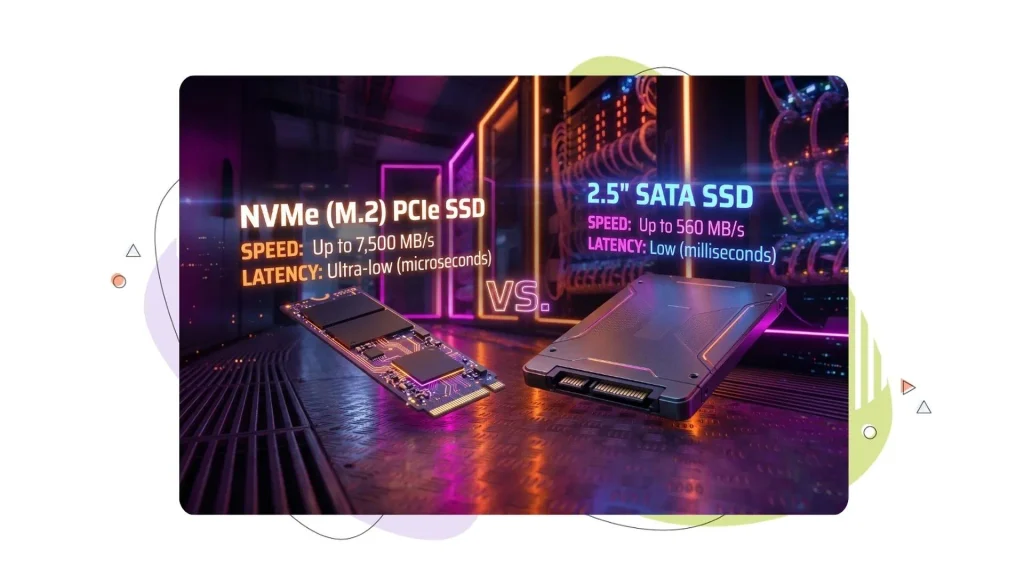
Published drive specifications show how much storage capabilities can differ. As a hardware-level example, a renowned manufacturer’s 1024GB SATA SSD lists sequential read speeds up to 550 MB/s. Its 1024GB PCIe 4.0 NVMe SSD equivalent lists up to 7,000 MB/s. These are manufacturer-rated limits for specific consumer drives, not measured VPS results.
| Published Specification | SATA SSD, 1024GB | NVMe SSD, 1024GB |
| Connection | SATA Rev. 3.0 | PCIe 4.0 x4 |
| Sequential read | Up to 550 MB/s | Up to 7,000 MB/s |
| Sequential write | Up to 520 MB/s | Up to 6,000 MB/s |
| Random 4K read | Up to 90,000 IOPS | Up to 900,000 IOPS |
| Random 4K write | Up to 80,000 IOPS | Up to 1,000,000 IOPS |
The figures come from our manufacturer’s published specifications for the two models.
Sequential throughput describes moving large amounts of data in order. Random IOPS describes how many smaller, scattered storage operations a drive can complete. Neither measurement tells you how quickly an entire webpage will load.
Treat these figures as examples of hardware capability, not a promise that an NVMe VPS will deliver the same numbers. Your hosting platform, resource allocations, caching, and application workload affect the result. To judge an upgrade, compare performance inside your VPS and on the requests that matter to your website.
How Storage Type Affects TTFB & Page Load Time
Storage affects website speed rankings when the server waits for a read or write operation before it can continue. That delay can contribute to the time visitors spend waiting for a response. However, database queries and server-side processing also take time, so disk access is only one possible source of backend delay.
Time to First Byte (TTFB) measures the time from starting a navigation until the first byte of the response arrives. It includes connection setup and server responsiveness, rather than measuring storage alone.
Lower TTFB gives the browser an earlier start on loading the page. Total page load time also includes downloading resources and displaying content. A quick server response won’t compensate for everything the browser still needs to do.
Caching changes how much work the backend performs. A page cache can reuse a prepared response rather than generate it again. Reusing cached content can avoid expensive database lookups and make a storage upgrade less noticeable on those requests.
Personalized requests need closer attention. Shopping carts, account pages, and other user-specific content may require fresh backend work instead of a shared cached response.
We recommend separating those requests from public cached pages when judging performance. A fast homepage and a slow account page can point to different problems, even when both run on the same VPS.
Who Needs NVMe VPS Hosting?
NVMe VPS hosting deserves the most attention when your workload makes frequent storage requests or generates several storage operations at once. The application’s behaviour matters more than its label or visitor count.
When evaluating NVMe hosting for eCommerce, focus on requests that need current or personalized information. Checkout, customer accounts, and inventory-related operations can require backend processing that a public page cache can’t replace. Your measurements should show whether storage contributes to the wait.
WordPress and WooCommerce sites also need workload-specific investigation. Plugin quality, theme behaviour, and backend customization can affect TTFB. A faster drive won’t remove unnecessary processing from a slow application.

When comparing database VPS hosting plans, examine query timings, memory allocation, and storage together. A database-driven site isn’t automatically storage-bound. Insufficient memory can also prevent an application from serving pages promptly.
Agencies should review periods when client workloads overlap. Imports, backups, file operations, and visitor requests can place demands on the same VPS. Testing only during a quiet period may miss the conditions that cause delays.
A smaller brochure site or well-cached blog may already perform well on SATA SSD hosting. If visitors receive fast responses and your resources meet demand, an NVMe label alone isn’t a reason to move.
Check the Bottleneck Before You Upgrade
A bottleneck is the part of your setup that limits performance. High TTFB can reveal a delay, but it doesn’t identify storage as the cause. Redirects, network distance, application processing, and caching behaviour can also affect the measurement.
Start with PageSpeed Insights. It can show both real-user data and a controlled lab test when the relevant field data is available. Compare those views because one test won’t represent every visitor’s experience.
Next, compare public cached pages with requests that need fresh backend work. Caching can hide a slow backend, so testing only cached content can give you an incomplete picture. Ask your developer to arrange controlled testing rather than changing cache behaviour across your live site.
| What You Observe | What to Investigate |
| Uncached pages respond slowly | Database queries, server-side rendering, and disk access |
| Cached pages are fast, but personalized pages are slow | Work that the application performs for each request |
| Delays appear during busy periods | Resource allocation and the application’s ability to handle demand |
| Distant visitors wait longer | Network distance and CDN delivery |
| The response arrives quickly, but main content appears late | Resource loading and browser rendering |
| Lab results look better than real-user results | Redirects, cache behaviour, and network differences |
PageSpeed Insights can reveal page load time problems, but it won’t tell you which drive your server needs. Ask your developer or hosting team to compare slow requests with backend timings, including database work and disk access. Storage deserves closer attention when those measurements show that disk operations contribute to the delay.
These observations guide an investigation; they don’t establish a diagnosis. Google’s TTFB guidance identifies these backend, caching, and network factors as areas to examine.
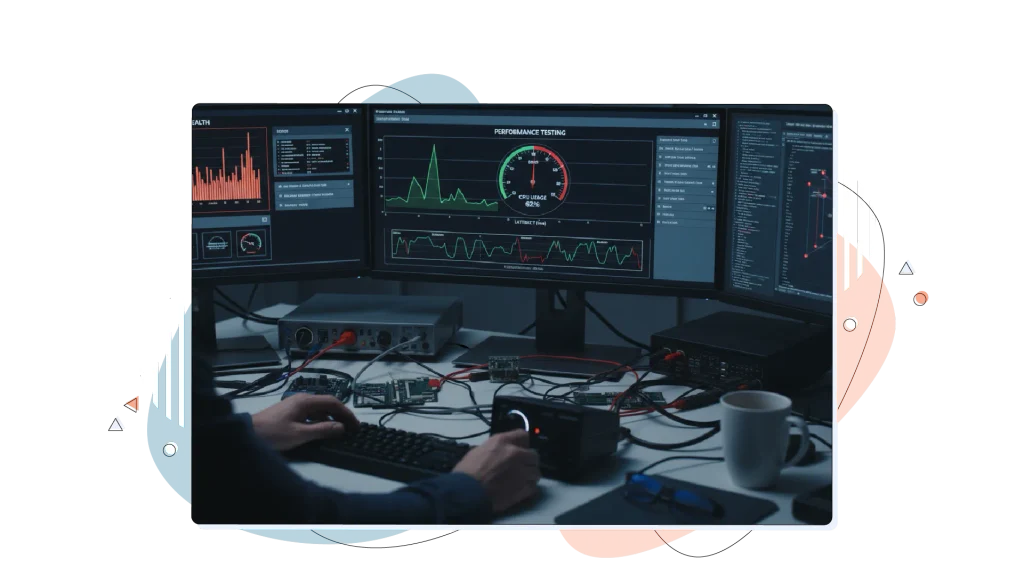
For deeper analysis, your developer can use application performance monitoring or the Server-Timing response header. With suitable monitoring or instrumentation, your developer can compare database work, rendering, disk access, and cache activity.
Record the affected pages, test conditions, and backend timings before making a change. Then repeat the same tests after the upgrade. That comparison is more useful than relying on an advertised storage-speed multiplier.
NVMe Hosting & SEO: How Storage Can Affect Loading Performance
NVMe storage can support your SEO efforts by helping your server respond sooner. NVMe SSDs have greater read and write speeds than SATA SSDs, so when storage slows a request, NVMe can shorten the wait for files and database records. That gives the browser an earlier start on loading your page.
Google evaluates page experience, and loading speed is part of that. Faster storage helps SEO by improving the loading results Google’s systems measure
Google’s Core Web Vitals measure three aspects of page experience:
- Largest Contentful Paint (LCP) measures loading performance. NVMe has the clearest effect here, because a quicker server response lets the browser start fetching your main content sooner.
- Interaction to Next Paint (INP) measures responsiveness. We talked about Google Interaction to Next Paint in another blog. NVMe can help when an interaction waits on a server request or database.
- Cumulative Layout Shift (CLS) measures visual stability. Storage speed doesn’t change layout shifts, which usually come from images, ads, and fonts loading without reserved space
Time to First Byte (TTFB) isn’t a Core Web Vital, but it comes before LCP, and a slow response makes a good LCP harder to reach.
Google’s page experience guidance confirms that Core Web Vitals contribute to its ranking systems, but good scores don’t guarantee top positions. Relevant, useful content still matters, so treat faster storage as one contributor to better rankings, not a guarantee of them.
Hosting is one part of improving Core Web Vitals. Review caching, image delivery, and frontend performance too. A Content Delivery Network (CDN) can also reduce distance-related delays by serving cached resources from servers closer to visitors.
Our global CDN guide explains how that delivery layer works. Check the features and configuration available with your selected VPS rather than assuming every hosting service includes the same CDN setup.
Managed vs Unmanaged NVMe VPS Hosting
Managed NVMe VPS hosting and unmanaged VPS hosting can use the same storage technology. The practical difference is who does the server administration. HostPapa includes NVMe storage in both management levels.
With HostPapa Managed VPS, we handle server-level work such as operating system patching, security monitoring, and software updates. Managed plans also include cPanel/WHM, a control-panel system for managing hosting accounts and services.
Unmanaged VPS gives you root access, which provides administrator-level control. You handle server configuration, updates, security patches, application installation, and migration. A cPanel licence isn’t included.
| Responsibility or Feature | HostPapa Managed VPS | HostPapa Unmanaged VPS |
| NVMe storage | Included | Included |
| Root access | Included | Included |
| cPanel/WHM licence | Included | Not included |
| Operating system patches | We handle server-level patching | You handle patching |
| Server administration | Managed administrative support | Your responsibility |
| Migration | Assistance for eligible migrations | Your responsibility |
These differences reflect HostPapa’s current VPS offering. Confirm the support scope for custom applications and your migration requirements before purchasing.
For a small business without an administrator, managed hosting can reduce the server work your team needs to take on. Developers and agencies with the time and skills to maintain their stack may prefer unmanaged hosting.
Access to support doesn’t remove unmanaged responsibilities. Choose the service level your team can maintain, not just the lowest advertised price.
Choosing VPS Storage Without Overpaying
Deciding on VPS storage starts with your workload. The best VPS storage choice also leaves enough CPU capacity and memory for the rest of your application. Faster drives can’t compensate for insufficient memory or a backend that struggles with incoming traffic.
If you’re making the SSD vs NVMe hosting test for a small business, work through these checks:
- Identify the delay you want to reduce: Use backend timings to establish whether storage, processing, or network conditions deserve attention.
- Match CPU and RAM to demand: Compare current usage and busy-period requirements, not just monthly visitor totals.
- Allow enough storage capacity: Include website files, databases, email, and expected growth.
- Choose a management level your team can support: Account for the time needed to maintain an unmanaged server.
- Compare the complete cost: Review renewal rates, commitment length, control-panel licences, backup requirements, and other add-ons.
NVMe VPS plans can be a sensible choice when you’re already purchasing new hosting and the complete service fits your requirements. For an existing site, the upgrade should solve a measured problem or support a defined growth need.
Check backup arrangements separately. HostPapa lists a VPS backup service as an add-on, so review that cost and coverage rather than assuming storage capacity includes a recovery solution.
We recommend setting a clear success criterion before moving. That might be reducing a measured backend delay on the affected pages. Use the same application configuration and comparable test conditions to judge the result.
HostPapa NVMe VPS Hosting: What You Get
HostPapa NVMe VPS hosting includes NVMe storage across our Managed VPS and Unmanaged VPS plans. Each plan allocates CPU, RAM, and storage to your account, with capacities that vary by tier.
Our VPS hosting features include a 99.9% uptime guarantee, a Free standard SSL certificate for encrypted connections, root access, and 24/7 PapaSquad support. Choose Managed VPS for included cPanel/WHM, server administration, and eligible migration assistance.
We keep storage type and management needs separate so you can choose the level of administrative help that fits your business. If you prefer Unmanaged VPS, you’ll maintain your applications and server configuration yourself.
Compare resource allocations against the work your website performs. A database-heavy application needs more than a storage label, and an agency hosting multiple sites should account for their combined resource requirements.
Review the purchase terms, too. Advertised discounted VPS prices use a three-year commitment and renew at regular rates. Your selected add-ons can affect the total cost.
Our VPS plans include a 30-day money-back guarantee, subject to the applicable cancellation conditions. Domain fees are non-refundable.
To get started with HostPapa VPS Hosting, compare VPS Plans to find the CPU, RAM, NVMe storage capacity, and management support that fit your website and budget.