Finding information in today’s data-packed (internet) world often takes more effort than it should. So much effort, in fact, that a new kind of web browser is emerging to handle repetitive tasks and automate actions for users. Instead of asking for something and doing the work themselves, users can let the browser act on their behalf, often with very good results, too.
Unfortunately, the current generation of web browsers is not equipped to support this level of automation. To make it possible, an entirely new class of software is required that relies heavily on automations, AI, machine learning, and natural language processing.
These tools, known as agentic browsers, are still in their infancy, even in 2026, and while promising, they face challenges. Many of these issues stem not only from technical limitations but also from the regulatory landscape surrounding AI.
In this article, we explore agentic browsers, the current state of browser automation, what these tools are, and how they may reshape the way we navigate today’s vast internet.
- The Dawn of Intelligent Web Browsing
- What Are Agentic Browsers? Going Beyond Traditional Web Navigation
- Core Technologies Behind Agentic Browsers
- How Agentic Browsers Work: A Simple Explanation
- Real-World Examples of Agentic Browsers
- Major Benefits of Agentic Browsing
- Implications for Web Design & Business Growth

The Dawn of Intelligent Web Browsing
Until recently, searching online still meant typing a website address or manually navigating to a search engine.
Traditional browsers are passive tools that fetch and render web pages for users to view, requiring manual user input for every action. One of the biggest automation shifts in modern browsers came when text entered into the address bar began triggering search queries automatically.
With the rise of chatbots like ChatGPT, Perplexity, and Gemini, even more of this process is being automated. This is especially true for information discovery and web scraping, which remain illegal in some regions.
Agentic browsers represent the next frontier of web interaction. They promise unmatched automation capabilities, but they also introduce new and serious challenges. Most automation tools for web applications require ongoing maintenance as websites change, which can be a burden for small teams.
Take Perplexity as an example. Sourcing information from websites has become dramatically easier for users. However, this convenience comes at a cost for website owners, as verified data shows reduced traffic and negative impacts on their businesses. Regulations play a critical role in preventing these technologies from causing long-term harm to the web ecosystem.
Browser Automation: The Next Step for Smart Web Browsing
Browser automation involves using software to perform user tasks automatically, such as navigating web pages, filling out forms, and extracting data, all without manual intervention.
Other browser automation tools expand on these capabilities by handling repetitive workflows, integrating with external services, and streamlining complex online interactions that would otherwise require constant user input.

What Are Agentic Browsers? Going Beyond Traditional Web Navigation
An agentic browser can interpret a goal (in natural language) and then execute multi-step actions on websites: clicking, scrolling, filling fields, and navigating, rather than only displaying pages for the user to operate manually.
OpenAI describes this pattern as an “agent that can use a computer,” which is a useful way of saying that the agent is operating the web UI like a person would, instead of only calling APIs.
Core Technologies Behind Agentic Browsers
Agentic browsers sit on top of a stack of intelligent components that turn natural-language goals into concrete actions on the web. These agentic browsers often function as platforms, providing APIs for integration and supporting complex workflows that involve multi-step tasks and decision-making.
At a high level, they combine Large Language Models (LLMs), computer vision, classic natural language processing, and decision-making logic orchestrated as workflows.
Large Language Models (LLMs) Integration
LLMs provide the reasoning engine that understands instructions like “find me a flexible flight to Berlin next Thursday and book it with carry-on only.”
Modern agentic browsers connect to frontier models (for example, GPT‑class, Gemini‑class) over APIs or via built-in assistants, using them to interpret requests, break them into steps, and generate everything from search queries to email drafts and form inputs.
This same LLM layer powers in-browser chat, explain this page, and deep research agents that can synthesize dozens of sources into a structured report with citations.
Computer Vision for Webpage Understanding
To act on pages, an agentic browser needs to see the UI: buttons, menus, forms, and tables.
Instead of hard-coding every site, newer systems use computer-vision-style models (or DOM-aware variants) that interpret layout, labels, and hierarchy so the agent can reliably click Book now or Add to cart even when the page design changes.
This perception layer lets agentic features like Neon’s Do or Comet’s agent operate across arbitrary sites, not just those with official integrations or APIs.
Natural Language Processing for Intent Interpretation
On top of raw LLM reasoning, agentic browsers use classical natural language processing techniques to extract structured intents, entities, and constraints from user prompts.
For example, travel tasks may be deconstructed into origin, destination, dates, budget, flexibility, and loyalty preferences before the agent ever opens a flight site, which lets it filter options and ask clarifying questions where needed.
This intent layer is also how assistants like Brave Leo or Edge Copilot decide whether a user wants a quick summary, a cross-tab analysis, or a multi-step action workflow.
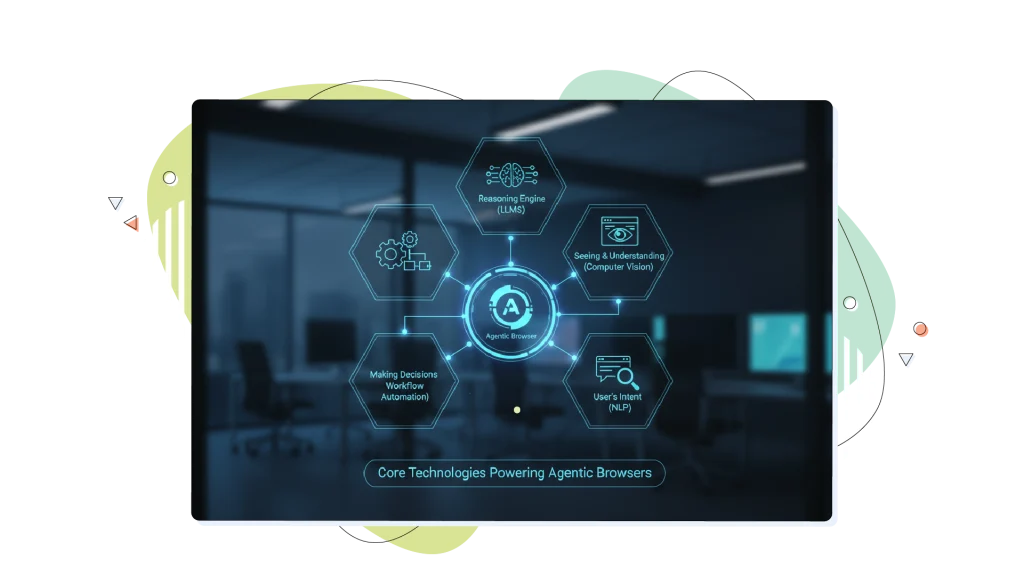
Core Technologies Powering Agentic Browsers
Agentic browsers combine multiple AI technologies to understand commands and act on the web automatically. Here’s a breakdown of the tech stack driving this new browsing era.
Different tools excel at different tasks, so it’s important to leverage curated resources and stay updated on new features and workflow enhancements to make the most of agentic browsers.
The Reasoning Engine Backed by Large Language Models (LLMs)
LLMs such as ChatGPT and Gemini enable browsers to interpret user instructions, plan tasks, and generate intelligent responses. They break down prompts like book me a flight to Berlin under €200 into actionable steps, searching, comparing, and completing the purchase, all from one command. LLMs also power features like contextual page summaries, deep research tools, and chat-based assistance.
Seeing & Understanding Webpages With Computer Vision
Computer vision models help the browser recognize buttons, forms, and layouts much like a human user. This allows AI agents to interact with websites that don’t offer APIs, clicking Book, Apply, or Add to Cart confidently, even when design elements change frequently.
Looking for the User’s Intent Using Natural Language Processing (NLP)
NLP helps the agent break down user requests into structured components, such as destinations, budgets, and preferences, ensuring accurate execution. It’s how AI browsers like Edge Copilot, Brave Leo, and Comet correctly interpret nuanced instructions across multiple sites.
Making Actual Decisions With Workflow Automation
Agentic browsers use AI-driven decision algorithms to plan multi-step actions, execute them, handle errors, and self-correct. This continual observe, act, learn cycle lets the browser refine results, ask clarifying questions, and optimize for efficiency over time.

How Agentic Browsers Work: A Simple Explanation
Agentic browsers combine everyday web browsing with artificial intelligence to understand what you want and then do it for you. Instead of clicking through dozens of pages, you can explain your goal in plain English, and the browser handles the steps automatically.
The most important feat of agentic browsers is that they’re designed to be user–friendly and intuitive, making them accessible even to business users with limited technical expertise.
Step 1: Understanding What Your Request Is
The process begins when you type or speak a command like “book a flight to Rome next weekend and find a nice restaurant nearby.”
The browser’s built-in AI, powered by Large Language Models (LLMs), interprets your intent, breaks it down into tasks (search, compare, decide, book), and plans the order of actions needed to complete them.
Step 2: Planning the Actions That Need to Be Taken
Once the request is understood, the AI builds a short plan: open a travel site, pick filters, check prices, and then look up restaurant recommendations.
This stage uses decision-making algorithms that act like a digital project manager, sequencing steps logically, and adapting if something changes along the way.
Step 3: Using the Web Browser & Acting on the Web
The browser then interacts with websites through standard browser functions, just like a human would:
- Opening new tabs.
- Clicking buttons.
- Typing in forms.
- Copying relevant information.
- Summarizing pages.
In Comet or Opera Neon, this agent mode can move seamlessly across multiple tabs while remembering what it’s doing, allowing full task automation.
Step 4: Checking for Accuracy & Safety of Results
Before finalizing actions like payments or bookings, reliable agentic browsers pause to confirm details with the user. This safety checkpoint helps prevent mistakes or unwanted actions, maintaining user control.
Browsers such as Comet and Operator use sandboxed environments and permission systems so the AI can’t access sensitive data without explicit consent.
Step 5: Learning & Improving Over Time
Every time you use it, the browser learns from the outcomes: what worked, what didn’t, so future actions become smoother and faster.
Over time, it learns to anticipate your preferences, including flight times and writing style, similar to a reliable personal assistant.
Real-World Examples of Agentic Browsers
Agentic browsing is no longer futuristic; several browsers already integrate AI agents that handle most web tasks independently.
1. Perplexity Comet: The AI Browser Pioneer
Perplexity’s Comet Browser acts as a true agentic assistant. It can research online, summarize pages, fill forms, and manage tasks across tabs through AI context awareness. Voice interaction is built in, and Comet seamlessly integrates with Perplexity’s AI search.
Originally limited to its Max subscribers, Comet became free in late 2025, with advanced performance tied to its Pro and Max plans.
2. Opera Neon: The Multifunctional AI Workspace
Opera Neon introduces an agentic workspace built around three functions: Chat, Do, and Make, plus Opera’s Deep Research Agent (ODRA). Users can automate tasks, generate content, and manage multi-step actions through a simple prompt interface.
With a specific price per month (it’s constantly changing), Neon integrates major AI models and offers advanced research and workflow tools for professionals.
3. Other AI Browsers Leading the Way
- ChatGPT Atlas (OpenAI): Embeds ChatGPT’s Agent Mode directly into browsing for hands-free research, planning, and task completion. ChatGPT is available in any window and allows users to summarize content, compare products, and analyze data from any website viewed.
- Microsoft Edge Copilot: Microsoft’s Copilot is integrated into the latest versions of Microsoft Edge, and it helps users summarize, analyze, and automate tasks across sites and tabs using Microsoft 365 data.
- Dia Browser: Minimal, AI-First browser that turns natural language commands into custom web skills.
- Opera Aria: Offers free multi-model AI chat in the Opera sidebar for quick assistance.
- Brave Leo: Focuses on privacy, running local AI models for summarization and analysis without sending data to external servers.

Major Benefits of Agentic Browsing
Agentic browsing eliminates repetitive clicks and transforms web use into automated workflows, for business and personal tasks alike.
Productivity & Efficiency Boost (When They Work)
AI Browsers automate research, form filling, and multi-step tasks, drastically reducing time spent navigating tabs. They can compile data, schedule meetings, or handle transactions on behalf of users 24/7.
Effective in Business Use Cases
For companies, agentic browsers make certain tasks easy, such as:
- eCommerce optimization: Comparing vendors and handling checkout flows.
- Travel booking: Managing reservations and full itinerary planning.
- Content operations: Generating posts, planning campaigns, or drafting outreach.
- Customer engagement: Auto-summarizing tickets, FAQs, or knowledge base materials.
Everyday Personal Uses
Individuals benefit from:
- Smart shopping assistance and price tracking.
- Event planning with automated venue research.
- Quick summaries of dense pages or documents.
- Inbox and calendar management, with meeting suggestions and smart email replies.
Implications for Web Design & Business Growth
Web developers must now design for two audiences, humans and AI agents. Clean HTML, semantic markup, and structured data make sites easier for both to parse.
Then, it’s APIs and the structured feeds that ensure that AI agents interact safely and predictably with your services: a rising SEO advantage as AI-Driven discovery grows.
Web automation depends on the reliability of automation tools, but these tools often require ongoing maintenance as websites change their structure.
Companies that optimize their sites and workflows for AI agents will benefit first. From better visibility in agentic search results to smoother automated transactions, preparing for this shift now can define the next decade of digital growth.
Implications in Terms of Security
Since most agentic browser automation happens in the cloud, little data is left on the user’s computer. For complete privacy, agentic browsers need a local AI model to power them, which in turn requires a more powerful computer to run on.
The next step in agentic browser evolution, we predict, will be full local AI support on handheld devices like smartphones, all the way up to laptops and desktop computers, which already seem to have the compute power to handle these tasks, as we see from products like Microsoft’s Copilot, which runs on many PCs.
Conclusion: Navigating the Agentic Future
The rise of agentic browsers signals a turning point in how we experience the web.
Instead of manually searching, clicking, and comparing, users are stepping into a world where their browser can think, plan, and act, turning complex online tasks into simple instructions.
The Benefits & Challenges Ahead
Agentic browsing delivers real productivity gains: faster research, fewer clicks, and automated workflows that free time for creativity and decision-making. For businesses, it means trusted, AI-Driven assistants that can manage bookings, content creation, or customer queries around the clock.
Yet challenges remain: ensuring users don’t lose control, verifying multi-step actions, protecting sensitive data, and maintaining transparency in what the AI is doing. Balancing automation and accountability will be critical as these systems mature.
The Inevitable Evolution of Browsing
Just as search once transformed the internet, AI-Powered and agentic browsing is becoming the next natural step. With Comet, Neon, and other pioneers already in action, mainstream adoption is no longer a question of if, but when.
Browsers of tomorrow will operate more like skilled digital coworkers than static tools, capable of using the web on our behalf, responsibly and efficiently.
FREQUENTLY ASKED QUESTIONS
How is an agentic browser different from a regular AI Assistant?
While an AI Assistant gives you answers or drafts, an agentic browser acts directly on the web, navigating pages, filling forms, or completing tasks within the browser itself. Agentic browsers aim to become advanced tools for navigating the web in the coming years.
Are agentic browsers available today?
Yes. Some are Perplexity Comet, Opera Neon, OpenAI’s Atlas, and Brave Leo. These browsers integrate conversational AI, automation, and real-time web actions.
Is my data safe when using an agentic browser?
Browsers like Comet and Brave use local storage for sensitive information and prompt the user before any action that may involve personal data. However, since privacy is a sensitive matter, especially when it comes to browser information, double-check each browser’s privacy policies.
Will agentic browsing replace human decision-making?
No, it generally helps humans make better decisions. It can also steer people toward making more informed decisions on several things, like traveling and shopping. Agentic systems automate repetitive actions, but users can still verify outcomes, make key judgments, and set the goals. The most responsible designs always include user confirmations and transparency.
Can I use an agentic browser offline?
Most current agentic browsers require internet connectivity because they rely on cloud-based AI models.
However, the future is moving toward hybrid and fully local models, enabled by technologies like WebNN and on-device NPUs. Browsers like Brave Leo already support local model execution for privacy-focused users, and this capability will expand as hardware improves.