If you want more local customers to find your business, your Google Business Profile is one of the best places to start. It’s free, highly visible, and often the first thing people see when they search for a nearby service, store, or professional on Google Search or Google Maps.
For small businesses, that matters a lot. A well-optimized profile can help you appear in the Local Pack, earn trust through reviews, generate more calls and direction requests, and turn searchers into paying customers without spending on ads.
Google My Business may be the name many business owners still use, but the platform is now called Google Business Profile. The goal, however, is the same: to give business owners a free way to manage how their business appears on Google and to make it easier for local customers to discover, contact, and choose them.
This guide will walk you through how to claim or create your profile, optimize it properly, and improve your chances of ranking higher in local search, whether you run a coffee shop, dental office, landscaping company, law firm, repair business, or home service brand.
- What Is Google My Business?
- Main Benefits of Google My Business
- Google’s Three Core Ranking Factors
- How to Claim or Create Your Google Business Profile
- Complete Your Business Profile for Maximum Visibility
- Build Credibility With Review Management Strategy
- Optimize Your Service Area and Categories
- Avoid Common Google My Business Mistakes
- Why Choose HostPapa for Your Local Business
What Is Google My Business?
Google My Business, now called Google Business Profile, is a free business listing tool that lets you manage how your business appears on Google Search and Google Maps. Google describes it as a free Business Profile that helps businesses get listed on Google Search and Maps and turn people who find them there into customers.
At its core, your profile is your digital storefront on Google. It can display your business name, address, phone number, website, hours, services, photos, reviews, posts, and other details that help people decide whether to contact or visit you.
Google’s support documentation also makes clear that eligible businesses include those with a physical location and service-area businesses that travel to customers.
That makes Google Business Profile especially important for local businesses. When someone searches for coffee shop near me, emergency plumber, or best accountant in Dallas, Google often shows map-based local results before standard website listings.
Your profile helps determine whether your business appears there and how convincing it looks when it does.
It’s also one of the few high-impact marketing channels that doesn’t require an ad budget. Instead of paying to be seen, you boost your chances by completing your profile, choosing the right categories, keeping your information accurate, earning reviews, and staying active with updates and media.
BrightLocal’s 2026 Local Search Ranking Factors study found that Google Business Profile signals account for 32% of Local Pack and Maps ranking factors, making the profile itself a major lever for local visibility.
In short, if your business serves a local market, Google Business Profile is not optional. It’s one of the most practical tools you can use to increase discoverability, build trust fast, and compete where local buying decisions actually begin.
Main Benefits of Google My Business
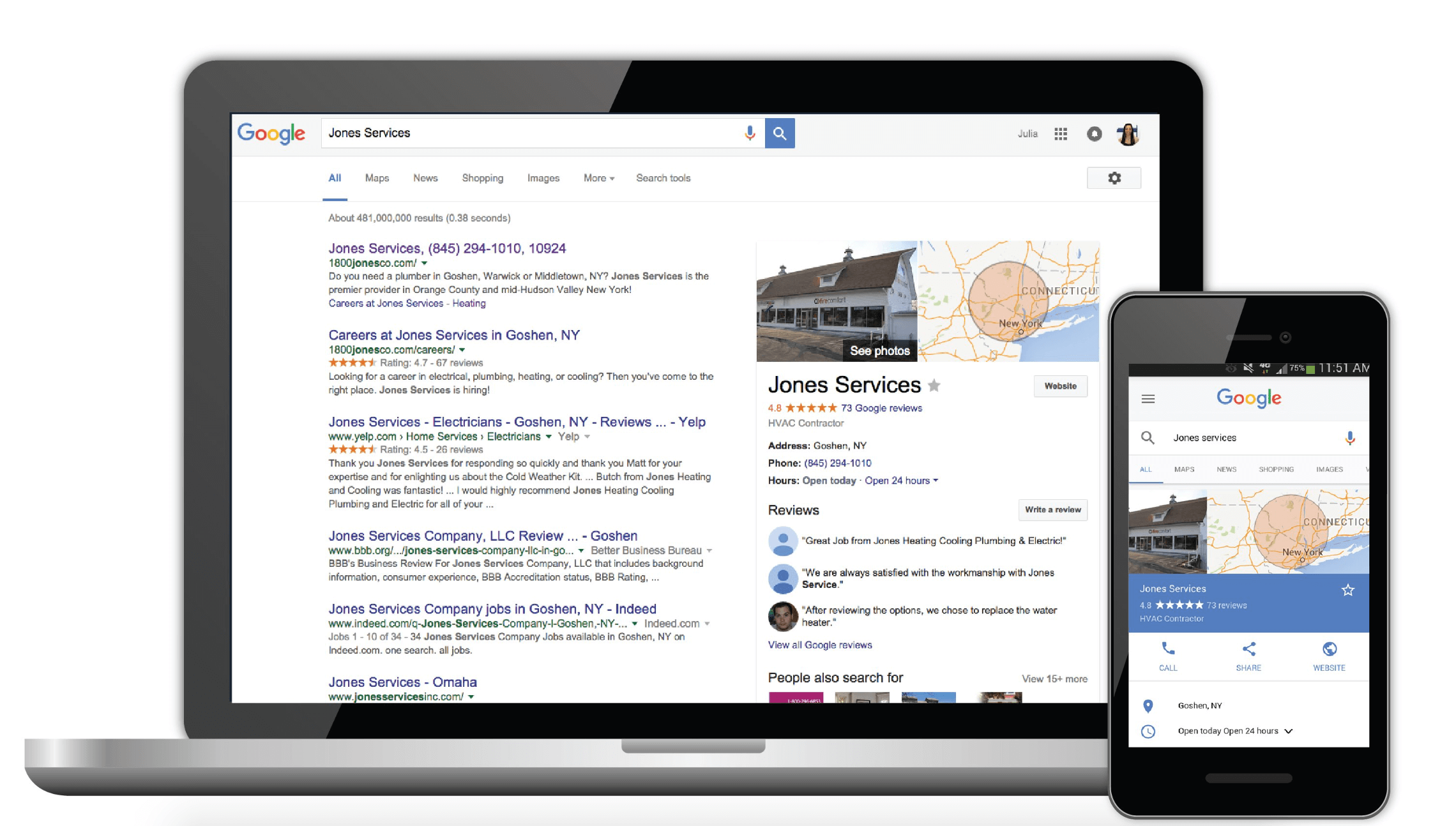
One of the biggest benefits of Google My Business is visibility. A properly managed profile gives your business a chance to appear in Google’s Local Pack and Google Maps, which are often the most prominent results for local-intent searches. Google’s local algorithm uses profile quality and relevance as part of how it decides which businesses to show.
Another major advantage is trust. Your Business Profile highlights ratings and customer reviews right where people are making a decision, and BrightLocal’s 2026 research shows that reviews now account for 20% of Local Pack ranking factors. That means reviews can influence both how high you rank and how likely a customer is to click, call, or visit.
It’s also a free marketing tool with serious practical value. Google lets you publish posts, answer FAQs, upload photos and videos, and respond to reviews directly through the profile, which means you can promote offers, updates, and events without paying for ads.
Google specifically notes that businesses can create posts, offers, and events, and respond to reviews and common customer questions through the platform.
There’s another benefit that business owners sometimes overlook: convenience. Customers can get directions, tap to call, visit your website, check your hours, read answers to questions, and compare your business with competitors in just a few seconds. That makes your profile a conversion tool, not just a listing.
And because your profile data appears where people already search, it supports the entire customer journey.
Someone may discover you through Maps, read your reviews, click through to your website, and book the same day. BrightLocal also identifies behavioral signals like click-through rate, calls, and user engagement as meaningful indicators in local search performance, so upgrading your profile helps both visibility and conversion.
Google’s Three Core Ranking Factors
If you want to rank your Google Business Profile, you need to understand how Google evaluates local results. Google states that local rankings are based primarily on three factors: relevance, distance, and prominence.
Relevance
Relevance is how closely your profile matches what someone is searching for. If a person searches for family dentist, Italian restaurant, or roof repair, Google wants to show businesses that clearly match that intent. Relevance is influenced by business categories, website content, local listings, backlinks, and user-generated content like reviews.
This is why choosing the right primary category matters so much. Google’s own guidelines say you should choose the fewest categories possible to describe your core business and make them as specific as possible.
Relevance also depends on how complete your profile is. Services, products, descriptions, hours, and business attributes all help Google understand what you offer. The clearer your profile, the easier it is for Google to connect you to the right searches.
Distance
Distance refers to how close your business is to the searcher or the location included in the search. If someone searches bakery near me, Google uses location signals to judge which businesses are nearby. If they search bakery in Phoenix, Google uses Phoenix as the location reference.
This factor is the hardest to influence because you cannot streamline your way into being physically closer than you are. What you can do is make sure your address is accurate, your map pin is correctly placed, and your service area is properly configured if you serve customers away from a storefront.
Google’s guidelines require a precise, real-world address or service area and warn against using virtual offices or inaccurate location details.
For service-area businesses, distance still matters, but a correct setup helps Google understand where you actually work. Google says service-area businesses should have one profile for the central office or base location and that the profile’s service area generally should not extend farther than about two hours of driving time from the base.
Prominence
Prominence is how well-known and trusted your business appears online.
Google considers signals such as reviews, ratings, links, citations, mentions across the web, and overall reputation. Prominence is being shaped by reviews, backlinks, behavioral signals, and business mentions, while Google’s own local ranking explanation says more prominent businesses may rank higher.
This is where brand authority starts to matter. Businesses with strong review profiles, consistent mentions across directories, and a well-optimized website tend to perform better because they look more established and trustworthy.
The answer is simple: You don’t rank a profile by doing one thing. You sharpen relevance with accurate categories and complete information, support distance with correct location setup, and build prominence through reviews, citations, website authority, and ongoing activity.

How to Claim or Create Your Google Business Profile
Setting up your Google Business Profile often follows one of two paths: Claim an existing listing or create a brand-new one. Either way, verification is required before you can fully manage the profile and access its features. Google’s help center organizes setup around adding and verifying your business, and profile photos and other features only appear after verification.
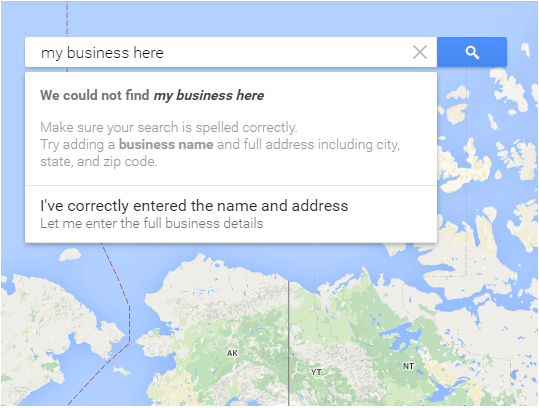
If your business already appears on Google Maps or Search, your first step is to search for the business name and see whether a profile already exists. This often happens when Google has created a listing from public data or when someone else previously added the business. In that case, you’ll need to claim ownership rather than start over.
If no listing exists, you can create a new profile through Google Business Profile. Google positions this as a free listing for businesses on Search and Maps, and eligible businesses include storefronts and service-area businesses.
Here’s a practical setup flow:
- Sign in with a Google account used for your business.
- Search for your business name.
- Claim the existing profile if one appears, or create a new listing if it doesn’t.
- Enter your core business information, including your real-world business name, category, phone number, website, address, or service area.
- Complete verification using the method Google offers for your business.
Verification methods can vary by business type and region. Google may offer postcard, phone, email, or video verification depending on eligibility, and support resources now frequently reference multiple verification paths.
Because Google has tightened trust and quality controls, some businesses are increasingly routed into video verification workflows, especially when location legitimacy is harder to confirm.
During setup, accuracy matters more than cleverness. Google’s guidelines say your business name should reflect your real-world name exactly as used on signage, your website, and other branding. That means no stuffing city names, services, taglines, or marketing phrases into the business title.
Google explicitly warns that unnecessary information in your business name can lead to profile suspension.
You should also avoid using virtual offices, fake addresses, or duplicate listings. Google only allows one profile per business location in most cases, and businesses that travel to customers should not show a residential address publicly if they don’t serve customers there. Service-area businesses are instructed to hide the address from customers when appropriate.
Think of setup as the foundation of your local SEO. If you rush it, add inaccurate information, or choose the wrong business type, every later optimization effort becomes harder. If you get it right, you give Google a reliable, policy-compliant profile it can confidently show to local searchers.
Complete Your Business Profile for Maximum Visibility
A half-finished profile sends two bad signals: it gives customers less reason to trust you, and it gives Google less context to understand your business. Google Business Profile remains the largest contributor to Local Pack rankings, which means thorough completion is not busywork; it’s core optimization.
Start with the basics: business name, category, phone number, website, address or service area, and hours. Google’s photo guidance also notes that certain features may not display properly if the profile is missing essential details like a valid location, categories, phone number, and opening hours.
Then move into the fields that strengthen relevance and conversion:
- Business description.
- Services or products.
- Opening hours and holiday hours.
- Attributes, such as accessibility or payment options where relevant.
- Photos and videos.
- Service areas.
- Questions and answers.
- Posts, offers, and business updates.
Your business description should explain what you do in plain language, not read like an ad. Google says the description should provide useful information about your services, products, mission, or history and should not include gimmicky content, links, or aggressive promotion.
Hours are more important than many businesses realize, and inaccurate hours can easily create frustration, bad reviews, and lost leads.
You should also connect your profile to a strong website experience. On-page signals are the top factor for local organic rankings. They are also highly influential for AI search visibility, which means your profile works best when it points to fast, relevant service pages and location content.
The practical rule is this: If Google gives you a field and it applies to your business, fill it out carefully. Every complete field makes your profile more useful to customers and more understandable to search engines.
Master NAP Consistency Across the Web
NAP stands for name, address, and phone number, and consistency across the web is one of the quiet foundations of local SEO. Local citations and listing signals help establish prominence, and matching NAP between your website and Google Business Profile is one of the top Local Pack ranking factors.
Google’s own guidelines reinforce the same principle from a policy angle. Your business should be represented consistently in the real world and across signage, stationery, your website, and your profile. Your address and service area must also be accurate and precise.
Why does this matter so much? Because inconsistent information creates confusion. If Google finds one phone number on your website, another on Yelp, and a slightly different address on a local directory, it becomes less certain about which details are correct. That weakens trust and can reduce visibility in local results.
To keep your NAP clean:
- Use the same business name everywhere.
- Standardize your street address format.
- Use one primary local phone number whenever possible.
- Update your website, directories, and social profiles when anything changes.
- Check for duplicate or outdated listings regularly.
This isn’t flashy work, but it’s worth doing. Consistent citations make your local presence more consistent, and dependability is exactly what Google wants when deciding which businesses deserve to rank.
Build Credibility With Review Management Strategy
Reviews are one of the strongest signals in local SEO and one of the biggest trust factors for real customers. But it’s not just the total number of reviews that matters.
The top-ranking factors include high star ratings, number of native Google reviews with text, recency of reviews, and steady build-up of reviews over time. That means review velocity, or getting fresh reviews consistently, often matters more than chasing a one-time burst.
Google also gives you ways to engage with reviews directly. The Business Profile platform allows businesses to respond to reviews, and review engagement helps demonstrate activity and trustworthiness, even if keywords in owner responses don’t directly boost rankings.
A strong review strategy looks like this:
- Ask for reviews consistently, not occasionally.
- Request reviews shortly after a successful transaction or completed service.
- Make the process easy with a direct review link.
- Respond to positive and negative reviews promptly.
- Never offer incentives that violate platform policies.
- Use feedback to revise your operations, not just your star rating.
The content of reviews matters too. Review language can reinforce relevance when customers naturally mention your services, products, or location. A review saying fast AC repair in Tampa sends stronger topical signals than a generic great service.
There’s also a conversion benefit here that goes beyond rankings. When prospective customers see recent, detailed, and well-managed reviews, they feel more confident reaching out. A business with active responses and a steady stream of feedback looks alive, attentive, and trustworthy, which is exactly the impression you want in a crowded local market.
Leverage Photos, Videos, and Google Posts
Visual content makes your profile more persuasive and more complete. Google’s support documentation says you can add photos and videos of your storefront, products, and services to help complete your Business Profile. Performing this action can make it more attractive to customers, and exterior photos can help people recognize your business when they arrive.
At a minimum, most businesses should upload:
- A logo.
- A strong cover photo.
- Exterior photos.
- Interior photos.
- Team photos.
- Product or service photos.
- Short videos where relevant.
For local businesses, visuals do two jobs at once. First, they help convert customers by reducing uncertainty. Second, they help reinforce trust and business legitimacy, especially for service businesses, restaurants, salons, clinics, and retail stores, where people want a sense of what to expect.
Google also notes that uploaded media appears only after verification, which is another reason to complete the setup early.
Posts matter too. Google Business Profile allows businesses to publish posts, offers, and event updates directly on the profile. The sheer quantity of posts is not a major direct ranking factor; posts still support engagement, freshness, and conversion by showing that the business is active and current.
A smart posting rhythm may include:
- Seasonal offers.
- New service announcements.
- Holiday hour updates.
- Community involvement.
- Helpful tips tied to your services.
- Time-sensitive promotions.
This is also increasingly relevant in AI-shaped search experiences. AI visibility is influenced by on-page content, reviews, citations, and overall business authority, while industry commentary notes that Google increasingly pulls meaning from profile content, services, and reviews.
In practical terms, fresh media and clear updates make your business easier for both humans and search systems to understand.
Optimize Your Service Area and Categories
Your categories are one of the most important choices you make inside your profile. Google’s guidance is very specific here. Choose as few categories as possible, make them as specific as possible, and pick categories that describe what your business is, not everything it has or every keyword you want to rank for.
Google even frames category selection as completing the sentence This business is a…, rather than This business has…
That means a family law office should choose Family Law Attorney if available, not stuff the profile with loosely related categories that don’t fit. A pizza takeout business should choose the category that best reflects how it actually operates, not just the broadest restaurant term.
Google provides category examples throughout its guidelines to show how precise classification helps keep search results accurate.
Service area setup matters just as much for businesses that travel to customers.
Google says service-area businesses should use one profile for the central office or base location with a designated service area, and businesses without a storefront should hide their address. It also notes that the overall service area generally should not extend more than about two hours of driving time from the base location.
This setup affects where and how your business can appear for local-intent queries. It will not magically make you rank everywhere in a metro region, because distance still matters, but it does help Google understand your operating footprint and present your business appropriately.
The simplest rule is to be accurate, not ambitious. Correct categories and a realistic service area tweak relevance and trust; exaggerated settings can do the opposite.
Engage Customers With Q&A Management
The Q&A section of a Google Business Profile is one of the most overlooked local SEO opportunities. Google’s Business Profile features allow businesses to post answers to frequently asked questions, which gives you a chance to remove friction before a customer ever contacts you.
That matters because people often use Q&A for high-intent concerns: parking, same-day service, pricing expectations, appointment rules, accessibility, delivery zones, pet policies, and more. If those answers are missing, unclear, or left to random public contributions, you lose control over a major part of the decision-making process.
A strong Q&A strategy is simple:
- Add common questions proactively.
- Write concise, helpful answers.
- Update answers when policies or services change.
- Monitor the section regularly so public questions don’t sit unanswered.
This section is also useful for matching how people really search. Questions often mirror natural language searches, which makes Q&A a practical place to address intent-rich topics in a clear, customer-first way. Done well, it helps with conversions, supports relevance, and shows that your business is responsive.
Voice Search Optimization for 2026
Voice search changes the way people phrase local queries. Instead of typing dentist Austin, they may ask, “Who’s the best family dentist near me that’s open on Saturday?” That makes conversational language, direct answers, and clear service information more important than ever.
Frame voice search does not work as a separate ranking system, but it does show that relevance, reviews, on-page content, and Google Business Profile signals remain central to local visibility across newer search experiences, including AI-Driven discovery.
In practice, the businesses best positioned for voice-style searches are the ones that clearly answer real customer questions across their profile and website.
To optimize for voice-style local search:
- Use natural-language questions in your website headings and FAQs.
- Add detailed services and attributes to your profile.
- Keep your hours accurate.
- Build review content around real services and locations.
- Answer common questions in plain, direct language.
Monitor Your Performance With GMB Insights
Optimization works better when you measure what customers actually do. Google Business Profile includes insights and performance data that show how people find your business and what actions they take, and Google positions this as part of the value of the platform for turning searchers into customers.
The most useful metrics often include:
- Website clicks.
- Phone calls.
- Direction requests.
- Discovery searches.
- Branded searches.
- Photo views and engagement.
These metrics help you move beyond vanity thinking. A profile with more impressions is nice, but a profile that drives more calls, bookings, and store visits is better. Behavioral signals, such as click-through rate and engagement, are meaningful local ranking influences, which means performance data can point you toward optimizations that support both rankings and revenue.
Use Insights to spot patterns. If calls spike after you add new reviews, that’s a clue. If direction requests rise after uploading storefront photos, that tells you visual trust is working. If one service page gets more clicks from the profile than others, that may be the service customers care about most.
In other words, don’t just set and forget your profile. Track it, learn from it, and keep refining it.
Avoid Common Google My Business Mistakes
Sometimes local rankings drop not because a business did too little, but because it did the wrong things. Google’s guidelines are clear that inaccurate representation, duplicate profiles, keyword-stuffed names, and improper address practices can all create problems, including changes to your information or even profile suspension.
Some of the most common mistakes include:
- Stuffing keywords into the business name.
- Choosing the wrong primary category.
- Creating duplicate listings for the same location.
- Using a virtual office or mailbox as the address.
- Leaving important fields incomplete.
- Forgetting to update hours.
- Ignoring reviews and questions.
- Using inconsistent NAP across the web.
Certain issues have a negative effect on local visibility, including incorrect primary categories, low star ratings, temporary or permanent closure status, and multiple profiles in the same category at the same address.
Another common mistake is treating the profile like a one-time setup task. Local visibility is competitive and ongoing. Reviews go stale, hours change, photos age, competitors improve, and customer expectations shift. A profile that looked strong a year ago can quickly become outdated.
The good news is that most of these mistakes are fixable. A careful cleanup, policy-compliant setup, and steady maintenance routine can restore trust and polish performance over time.
Why Choose HostPapa for Your Local Business
Your Google Business Profile helps people discover you, but your website is often where they decide whether to contact you. That means local SEO does not stop at your profile. It continues on the pages people land on after they click through. That’s where a reliable hosting partner matters.
A fast, stable website supports the customer experience after someone finds you on Google Search or Maps, and it gives you a stronger place to send traffic from your Business Profile. When your site loads quickly, works well on mobile, and clearly explains your services, your profile traffic is more likely to turn into calls, bookings, and sales.
For local businesses, HostPapa can be part of that bigger system. Alongside hosting, you need strong service pages, accurate contact information, optimized location content, and a website that reflects the same trust and professionalism your Google Business Profile is meant to show.
That alignment between profile and website is exactly what helps local marketing work better, and we’re here to support you on the journey.
FREQUENTLY ASKED QUESTIONS
Is Google My Business free?
Yes. Google Business Profile, formerly called Google My Business, is a free tool that lets businesses manage how they appear on Google Search and Maps.
Is Google My Business the same as Google Business Profile?
Yes. Google My Business is the old name, and Google Business Profile is the current name for the platform.
How long does Google Business Profile verification take?
The timing can vary depending on the verification method Google offers. Google now uses several verification methods, including solutions such as postcard, phone, email, and video in some cases, so timelines are not identical for every business.
What kinds of businesses can have a Google Business Profile?
Businesses with a physical location customers can visit, and service-area businesses that travel to customers are eligible. Google says service-area businesses should hide their address if they don’t serve customers at that location.
What is the most important Google Business Profile ranking factor?
There is no single universal factor, because Google says local rankings are based primarily on relevance, distance, and prominence together.
Do Google Posts help rankings?
The quantity of Google Posts does not have a strong direct impact on rankings, but posts can still boost engagement and conversion by showing customers that your business is active and current. Google also supports posts, offers, and events as part of the platform.
Do reviews help local SEO?
Yes. Reviews are one of the strongest local SEO signals. Review recency, volume, star ratings, and steady growth over time all matter.
Can I use a virtual office for my Google Business Profile?
No, not in the usual sense. Google says a virtual office is not eligible for a Business Profile unless the location is staffed during business hours and otherwise meets its requirements.