Extendify is an AI-Powered WordPress website creator and site assistant that helps users build and manage WordPress websites. Using Artificial Intelligence (AI), Extendify operates as an integrated ecosystem. It requires the main Extendify plugin, the Extendable theme, and the site assistant license plugin to deliver an AI agent directly inside the WordPress dashboard.
Extendify generates content using native WordPress core Gutenberg blocks instead of a proprietary page builder framework. This process ensures compatibility with standard WordPress tools and themes.
What are the benefits of using Extendify?
Extendify’s main benefit is streamlining website creation. This lets users launch fully customized sites from scratch with AI assistance, even without web development experience.
Core WordPress blocks create all designs. Websites remain completely intact and functional, even if Extendify is uninstalled. This process eliminates risk and vendor lock-in. The built-in AI agent also provides intelligent ongoing site management and automation across integrated WordPress plugins such as WooCommerce, WPForms, and SimplyBook.me.
Plan eligibility and technical requirements
Extendify is available on the following HostPapa hosting plans:
Please note: Extendify is not available on Reseller, VPS, or Dedicated Hosting plans.
How to install WordPress to enable Extendify
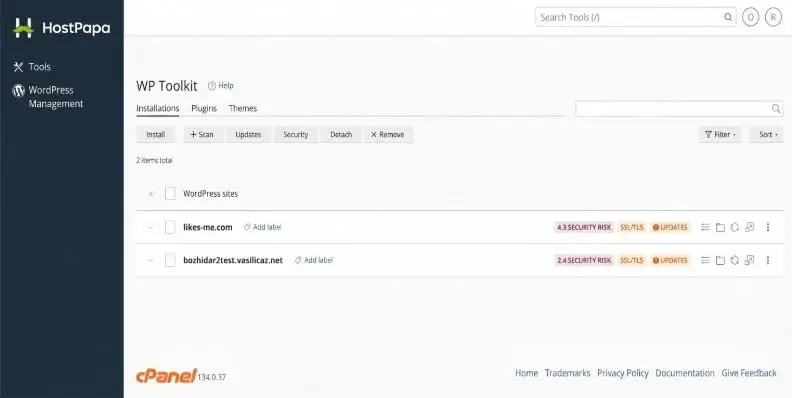
Your WordPress application must be installed using WP Toolkit in cPanel. This action is so that your WordPress application can benefit from Extendify’s AI site-building features.
Step-by-step installation guide
- Log in to your HostPapa Dashboard and navigate to cPanel/My WordPress.
- Open the WordPress Management (WP Toolkit) application (located under the WordPress Management section).
- Click Install to create a new WordPress instance.
- Select your preferred domain or subdomain, site title, and administrator credentials.
- Proceed with the installation. WP Toolkit will automatically provision WordPress along with the Extendify plugin, the Extendable theme, and the license plugin.
- Once the installation is complete, log in to your WordPress Dashboard (/wp-admin). The Extendify onboarding wizard and AI site assistant will automatically launch.
Important information for existing or migrated websites
- Fresh installations only: The Extendify AI license is automatically enabled only for brand-new WordPress installations created via WP Toolkit.
- Existing/Migrated sites: Extendify can’t be automatically enabled on existing WordPress websites or websites migrated from external servers. This is to avoid conflicts with existing themes or active plugins breaking the site’s CSS formatting or causing critical errors across the entire website.
Please note: If you wish to use Extendify on an existing domain, you must install a fresh WordPress instance via WP Toolkit and build your website from scratch.
If you need help with your HostPapa account, please open a support ticket from your dashboard.